 AI to PDF
AI chat to PDF in one click
Open any conversation on ChatGPT, Claude, Gemini, DeepSeek or Grok, click once, and get a document that looks designed, not printed. PDF, Word or Markdown, built inside your browser.
Rewrite the nightly billing job as a Cloudflare Worker cron. Keep the retry logic.
Here is the scheduled handler with exponential back-off kept from your original script:
Two things change compared with the cron server:
| Before | After |
|---|---|
| node-cron on a VPS | Worker cron trigger |
| Retries in shell loop | withRetry() helper |
Ctrl+P prints the web page. This exports the conversation.
Same chat, two files. The one on the left is what the browser’s print dialog gives you on chatgpt.com; the one on the right is the AI to PDF export of the same conversation, untouched.
- Sidebar, prompt box and URL header on the page
- Only the messages that were loaded on screen
- Code wraps into one line, dark background eats ink
- No page breaks, no title, no speaker labels
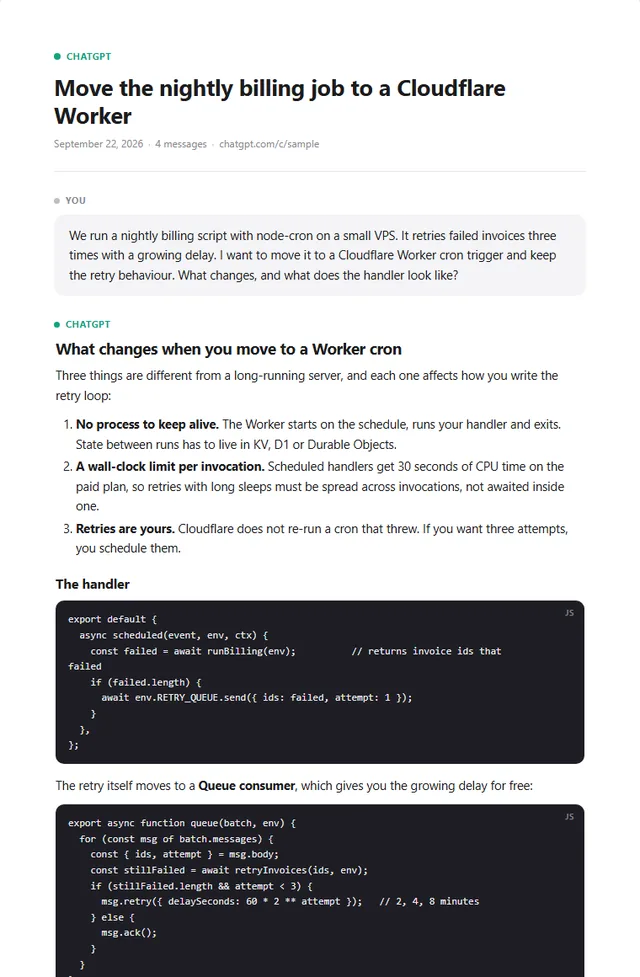
- Every message, in order, with a title block
- Code blocks keep their language and their lines
- Tables, quotes and links stay what they are
- Clean page breaks and page numbers; light or dark
See the output before you install
These are real files produced by the extension’s own template from one conversation, with the free-plan footer line included. No screenshots, no mock-ups.
How it works
No settings to learn. The extension knows which AI site you are on and does the right thing.
Open a conversation
Any chat on ChatGPT, Claude, Gemini, DeepSeek or Grok, in your normal logged-in browser. Nothing to paste, no share link needed.
Click Export
Pick PDF, Word or Markdown, and whether you want the whole chat, only the last reply, or hand-picked messages. Three options, nothing else.
Save the file
The PDF opens print-ready with “Save as PDF” already selected. Word and Markdown download straight away as .docx and .md files.
What ends up in the file
Most AI chat to PDF tools print the web page. AI to PDF rebuilds the conversation as a document, so it survives the trip to a client, a colleague or your archive.
A designed layout
Clear You / Assistant turns, real headings, lists, blockquotes and page numbers. Long chats paginate cleanly instead of cutting mid-sentence.
Code that prints correctly
Fenced code blocks keep their language label and a monospace font with ligatures off, so => and <!-- come out as typed.
Tables and images
Tables keep their columns. Images the assistant generated and files you uploaded are embedded in the PDF, not replaced with a broken-link icon.
Markdown, unlimited
GitHub-flavoured Markdown with tables and fenced code, ready for Obsidian, Notion or a repo. Free and unlimited on every plan. About the Markdown export →
Word, when it must be edited
The same document as an editable .docx: speaker blocks, code with language, tables, images. For the report a client will rework. About the Word export →
Light or dark
Two document themes. Dark keeps the full-bleed background on every page, light is ink-friendly for printing on paper.
Local by design
The two most-installed exporters in this category send your conversation to their server to build the PDF. AI to PDF does not have a server that could read it.
The extension reads the conversation from the page you already have open, rebuilds it as a document and hands it to Chrome’s print engine. That is why there is no upload progress bar, no account and no “processing” step. What our server does see: an anonymous install ID and how many PDFs it exported today, so the free limit and PRO licences work. Nothing about what was in them. The details are in the privacy policy.
Who exports AI chats as documents
The same three formats cover very different desks. Pick the one that matches how the file will be used, not how it was made.
Consultants and agencies
A research thread or a first draft goes to the client as a clean PDF with your questions visible, or as Word so they can rework it. No footer line on PRO.
Developers
The debugging session that solved it, saved next to the code as Markdown, with every fenced block intact. Free and unlimited.
Teachers and students
A lesson plan, a worked example or a study guide as an editable .docx, printed as a light PDF, or filed as a dark one for reading on screen.
One extension, every AI you use
You never install a second exporter. The same button, the same document, the same PRO licence on ChatGPT, Claude, Gemini, DeepSeek and Grok.
ChatGPT to PDF
Exports the full chat even when ChatGPT has unloaded older messages from the page, keeps web-search citations as footnote links, and embeds generated images. ChatGPT export details →
Claude to PDF
Handles Claude’s long, code-heavy answers, lists artifacts by name, leaves extended-thinking blocks out, and includes files you attached. Claude export details →
Gemini to PDF
Works on gemini.google.com, including images Gemini generated in the chat. Thoughts are left out, the whole exchange stays in one document. Gemini export details →
DeepSeek to PDF
Works on chat.deepseek.com. DeepThink reasoning is left out of the document, the answers are kept in full, long chats are collected completely. DeepSeek export details →
Grok to PDF
Works on grok.com. Messages come out in the right order even though Grok positions them freely on the page; thinking is left out, answers stay complete. Grok export details →
Pick what to export
On every site: all messages, only the last reply, or tick the ones you want. Sharing a single answer takes two clicks.
Simple pricing
Free for everyday use. PRO when the documents go to clients.
- 1 PDF or Word export a day
- Unlimited Markdown exports
- All five AI sites, all three options
- Small “Exported with AI to PDF” line at the end
- Unlimited PDF and Word exports
- No footer line in the document
- Works on up to 5 devices
- Priority support by email
Billed by PIXON via Stripe · Pricing details
Frequently asked questions
Is AI to PDF free?
Yes. The free plan gives you 1 PDF or Word export a day with a small “Exported with AI to PDF” line at the end of the document, and unlimited Markdown exports. No account is needed. PRO removes the footer line and the daily limit for €2.99 a month or €24.99 a year, and one licence works on up to 5 devices.
Does my conversation get uploaded anywhere?
No. The document is built by the extension inside your own browser and saved with Chrome’s print engine, so the text and images of your conversation never leave your computer. The only thing our server sees is an anonymous install ID and a daily export count, which is how the free limit and PRO licences are enforced.
Which AI chat sites are supported?
ChatGPT (chatgpt.com), Claude (claude.ai), Gemini (gemini.google.com), DeepSeek (chat.deepseek.com) and Grok (grok.com). The extension recognises the site from the URL, so there is nothing to configure: open a conversation, click the button, export.
Can I export only part of a conversation?
Yes. Choose All messages, Last reply, or Pick and tick the messages you want. Last reply is the fastest way to share a single answer with someone.
What happens to code blocks, tables and images?
They are kept. Code blocks get a language label and a monospace font with ligatures switched off, so symbols like arrows and comment markers print exactly as written. Tables keep their columns, and images, including files you uploaded, are embedded in the document.
How is the PDF saved?
The extension opens the finished document in a print-ready tab and starts Chrome’s print dialog with “Save as PDF” selected. Pick a folder and you are done. The Markdown export downloads directly as a .md file, and the Word export as a .docx file.
More questions? See the full FAQ.
Your next AI chat, as a document
Install free, export one document today, and see the difference between a printed web page and a designed file.
Add AI to PDF to Chrome